🚀 Introduction
- Ensure Java is installed on your system. If not, download it from the official Java website.
- Create an account on DS Cloud via the login page using your email, Discord, or both.
- Make sure you have an active paid plan. View and purchase plans here.
⚙️ Creating the dscloud config file
Learn about: how to make the configuration file for DS Cloud.
The
dscloud.pt file configures your application, defining its name, description, version, main file, and more.📄 Required Files
project.jar(main application file).MANIFEST.MF(dependency file).- dscloud.pt/.config (DS Cloud configuration file).
▶️ Start Application
- If the
STARTfield is not defined in the configuration file, DS Cloud will runjava -jar MAIN, whereMAINis the file specified in theMAINfield of the configuration file. If theSTARTfield is defined, its value will be executed directly. Learn more about configuration file parameters here.
🖥️ Preparing Your Java Project
Before hosting your project on DS Cloud, ensure your project files are correctly configured and ready for deployment.📄 Required Files for Deployment
- dscloud.pt/.config
- Main application file (
project.jar) - Dependency file (
MANIFEST.MF)
💡 Troubleshooting
Invalid or Corrupted Main File
Invalid or Corrupted Main File
Ensure the
MAIN field in the configuration file correctly points to your JAR file. For files in subfolders, use the format folder/file.jar.Insufficient Memory
Insufficient Memory
Minimum RAM requirements:
- Bots: 256MB
- Websites/APIs: 512MB Depending on your application’s size and complexity, allocate more RAM to avoid the LACK_OF_RAM error.
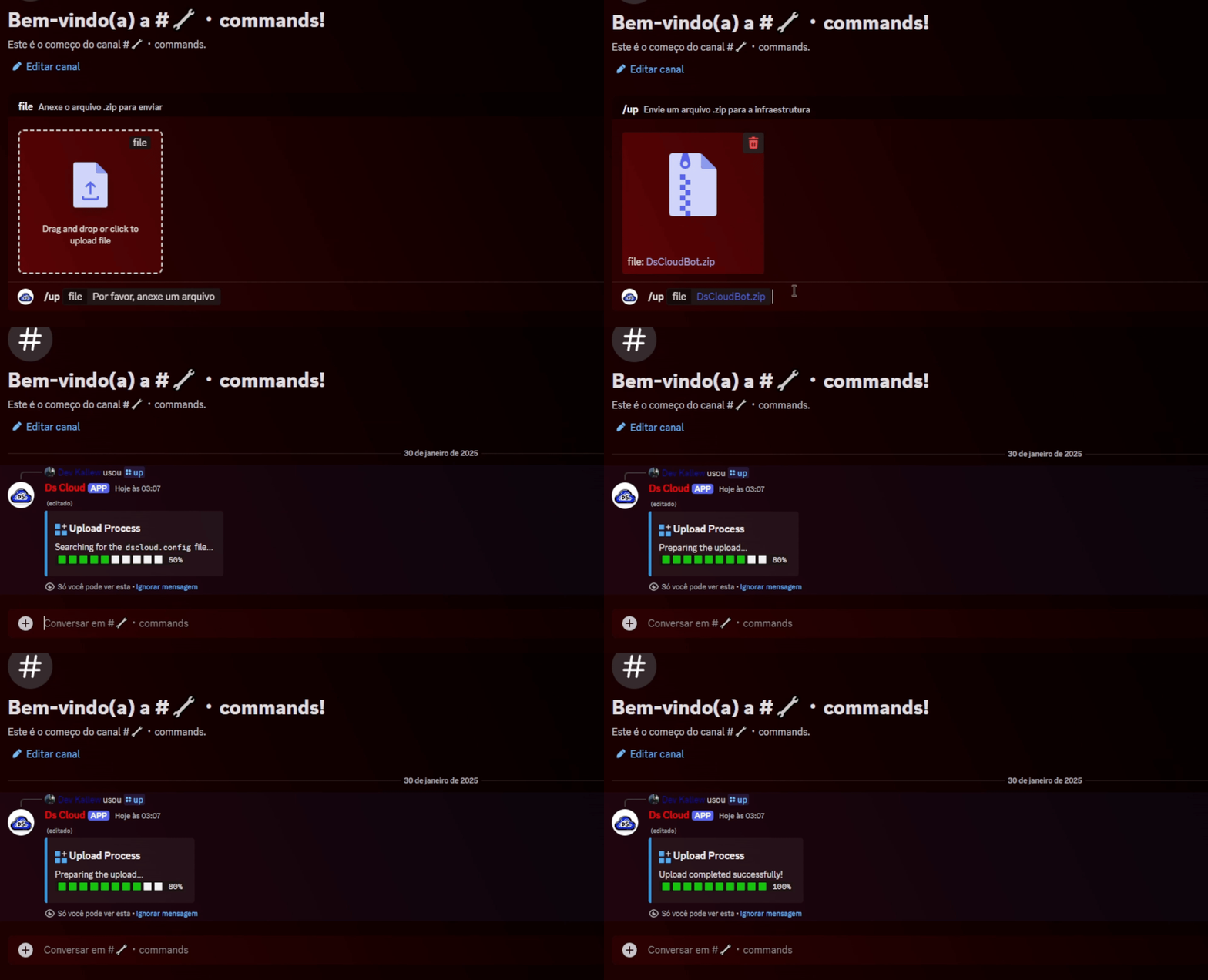
📤 Uploading Project to DS Cloud
After preparing your project files, upload them to DS Cloud to host your application.- Discord Upload
- Go to the DS Cloud Discord server and use the
/upcommand in the#commandschannel. - A new private channel will be created for you.
- Upload your
.zipfile in the created channel to deploy your application.